


Bouncie
4.2674.00 Reviews
App Specs
- Version
- 4.25.13
- Updated On
- License
- Free
- Downloads
- 100,000+
- Developer
- Tail Light, LLC
- Categories
- Auto & Vehicles
- Platform
- Android
Screenshots
 Analysis by AppCompare
When a car is shared by several people, the hardest part is often not finding the vehicle but knowing what is happening between trips. I found Bouncie most useful in that everyday gap: it turns a compatible car into something the household can check and coordinate around, rather than relying entirely on messages, memory, or a phone call. It is a free Auto & Vehicles app from Tail Light, LLC, and its central idea is simple: driving information becomes available through a connected setup.
I would not describe it as a general driving companion for every phone user. It is better understood as part of a vehicle-monitoring arrangement. That distinction matters because the experience depends on more than installing an app. You need to think about which car is connected, who should be able to see information, and how the people using that car will agree on its use. Once those boundaries are clear, the app can be genuinely practical for a household with a shared vehicle.
How Bouncie fits into a shared household
My favorite use case is a family with one vehicle used for school runs, errands, work, and occasional borrowing. Imagine a parent leaving for work while another adult needs the car later in the morning. Instead of asking repeatedly whether the vehicle has returned, the household can use the connected information available through Bouncie to coordinate the next trip. That does not remove every conversation, but it can make routine planning less dependent on someone remembering to send an update.
This is also useful for a household where a car is lent to a relative or another trusted driver. The value is not simply seeing a dot on a map. It is having a shared reference point when plans change: a delayed pickup, an unexpected stop, or a vehicle that has not arrived when people expected it to. In my experience, that kind of visibility is most helpful when it supports calm coordination rather than constant checking.
There is a subtle trade-off here. A connected car can reduce uncertainty, but it can also create too much temptation to monitor every movement. I would recommend agreeing in advance on what the app is for. If the purpose is vehicle recovery, trip coordination, or reassurance during a long drive, say that clearly. If every journey becomes a reason to question the driver, the technology may create household friction instead of solving it.
The app’s audience is therefore broader than a single owner, but not unlimited. It suits people who share responsibility for a vehicle and are comfortable using connected information together. It is less suitable for someone who wants a standalone navigation tool, a fuel-price finder, or an app that works without any vehicle-side setup. Bouncie belongs in the connected-car category, and that shapes both its strengths and its limitations.
What the first setup really involves
The first important boundary is the car itself. Installing the application does not magically connect every vehicle in a household. The experience is tied to the vehicle connection associated with the service, so I would begin by deciding which car needs monitoring most. If a family has several cars, it is worth starting with the one that is shared most often rather than trying to organize everything at once.
Worth Reading Before You Choose

EA SPORTS FC Mobile 26 Is a Bigger Football Game, but It Takes Time

Flipboard Shows What News Apps Must Do Beyond the Feed

Switching to Android Auto Means Rethinking Your Driving Routine

Google Calendar Makes a Crowded Week Easier to Manage

Ludo King Makes the Most of the Minutes Between Plans

Baby Panda World Brings Quick Play to Modern Phones, but Its Game Library Feels Busy
I would also decide who should manage the account before inviting other household members into the routine. A primary account holder should be someone who can handle the vehicle connection and make sensible decisions about access. That person does not have to be the only person involved in coordination, but keeping responsibility clear avoids the confusion of several people changing settings or assuming they have the same level of control.
This is one of the less obvious lessons with a service like Bouncie: the account boundary is part of the product experience. The app may be easy to open, but the household still needs a practical arrangement around it. A shared tablet, a parent’s phone, or several personal phones can lead to very different expectations. Before using it, I would decide which devices are appropriate and whether everyone who can view the vehicle understands that access.
For a shared device, I would be especially careful about leaving an account signed in. A phone used by several people can blur personal and household information. Even when the people involved trust one another, a separate personal device is usually easier to manage than a communal screen that anyone can open. The app should support coordination, not become an accidental household noticeboard for private driving details.
Another practical step is to test the arrangement during a normal short trip rather than waiting for an urgent situation. Have the usual driver take the car, let the other household member check the information, and confirm that everyone understands what they are seeing. This helps expose simple misunderstandings early, such as expecting live conversation when the app is really being used for trip awareness.
Using it for coordination instead of surveillance
Bouncie makes the most sense when it answers a specific household question. Is the car back yet? Has the driver started the trip? Can someone plan a pickup around the vehicle’s return? Those questions are concrete and limited. I found that a shared app works better when people use it to make decisions instead of repeatedly refreshing it without a clear reason.
A useful routine is to combine the app with a simple message. For example, the driver can say that the car is leaving for an errand, while the other person uses the connected information to plan around the trip. That small human step matters because app information does not always explain the reason behind a stop or a change of route. Bouncie can provide context about the vehicle, but it should not replace basic communication between people.
This approach is particularly helpful for households with changing schedules. One adult may need the car after another finishes work, or a teenager may be using it for a planned activity. Instead of treating the application as a constant report, I would use it as a coordination layer: check when needed, make the plan, and then leave the driver alone to concentrate on driving.
The strongest workflow I found is to establish a few predictable moments for checking. Before a pickup, when a vehicle is overdue, or when someone is waiting for the car to return are sensible examples. The weaker workflow is opening the app throughout the entire day simply because the information is available. That habit can make a household feel watched and can turn a helpful tool into a source of arguments.
There is also a useful distinction between vehicle information and driver information. The app is centered on the connected car, while a person’s intentions, circumstances, and consent still belong in a conversation. If a driver takes a different route because traffic changes or stops somewhere unexpected, the app may show movement without explaining the decision. I would treat it as a practical signal, not a complete account of someone’s day.
Age, trust, and shared responsibility
Bouncie is marked for Everyone, which makes it approachable for a broad audience, but an age label does not settle the household question of trust. A younger driver may appreciate knowing that someone can help coordinate a pickup or check on a trip. At the same time, that driver should understand who has access and why the app is being used. Clear expectations are more important than simply putting the application on another person’s phone.
For a new driver, I would present Bouncie as part of a safety and planning conversation rather than as a hidden observer. Explain what the household wants to know, when someone might check, and how concerns should be raised. That makes the arrangement easier to accept and gives the driver a fair chance to ask questions. Trust is damaged when monitoring is discovered unexpectedly, even if the original intention was protection.
With adult family members, the same principle applies. Sharing a car does not automatically mean sharing every detail of every trip. A household can agree that the vehicle should be visible for return times or emergencies while still respecting personal space. I would not install or use a connected-car service around another driver without discussing it first.
This is also where Bouncie may not be the right choice. If the people sharing the vehicle disagree about visibility, the app cannot solve that disagreement. A basic reservation calendar, a group chat, or a simple key handoff may be healthier for that household. Technology is helpful only when the people involved accept the boundaries around it.
For older relatives or less technical users, the main challenge may be explanation rather than operation. I would keep the shared routine simple: identify the vehicle, explain the purpose, and show only the information needed for coordination. Avoid turning the app into a complicated lesson about every possible screen. A focused introduction makes it more likely that the person will feel supported rather than managed.
What the app does well in daily use
The main strength is focus. Bouncie is not trying to be a large dashboard for every driving-related task. Its role is connected awareness around a vehicle, which makes it easier to understand in a household context. When the car is shared, that focus can be more useful than a collection of unrelated tools that each require a different account or routine.
I also like that the app is free to download. That lowers the barrier for someone who wants to evaluate the phone experience before committing to a household workflow. Still, “free” should not be interpreted as meaning that the entire connected-car arrangement has no practical requirements. The app is only one part of the setup, so I would examine the vehicle connection and account expectations before making it central to family planning.
Its established presence is reassuring for people who prefer not to build a routine around an obscure utility. The app has a 4.2 average from around 1.8 thousand ratings, with over 100 thousand installs, so there is a meaningful community of users behind it. Those figures do not guarantee that every household will have a smooth experience, but they suggest that Bouncie is not merely a short-lived experiment.
The current version is 4.25.13, and the app runs on Android 7.0 or later. That makes it accessible on many older Android phones, which is useful when a household has a spare device for vehicle-related tasks. I would still keep the app updated where possible, because connected services depend on reliable communication between the phone application and the vehicle-side setup.
One practical tip is to separate “who needs access” from “who owns the car.” In a shared household, the registered owner may not be the person who coordinates daily trips. Keeping those roles distinct can make the arrangement more realistic. The owner can remain responsible for the connected setup while another trusted adult uses the information for pickups or scheduling.
Where the usual alternatives may be better
The obvious alternative is a group chat. For a household that only needs to say “the car is back” or “I am leaving now,” messages are cheaper in effort and more personal. A calendar can also work well when trips are predictable. These tools are better than Bouncie when the household already communicates reliably and does not need connected vehicle awareness.
A phone’s built-in location sharing may be a better fit when the real concern is the driver rather than the car. That approach follows the person’s device and can make sense when several forms of transport are involved. Bouncie is more appropriate when the vehicle itself is the object that needs coordination, especially when different people drive it at different times.
Navigation applications are another different category. They are designed to help someone choose a route while driving, not to organize access to a shared vehicle after the trip begins. If your main goal is directions, traffic avoidance, or finding a destination, Bouncie should not replace a navigation tool. Its value appears before and around journeys, not as a conventional turn-by-turn companion.
For a single driver who owns one car and rarely lends it out, the benefit may feel limited. That person may not need household visibility and may prefer a simpler setup with fewer connected services. I would choose Bouncie when the coordination problem is real, not merely because the idea of a connected car sounds interesting.
Questions I would settle before relying on it
The first question is whether installing the app alone is enough. In practical terms, I would assume the household needs the appropriate connected vehicle arrangement and would confirm that before planning around it. The application is the viewing and coordination side of the experience; it is not a universal replacement for the hardware or service relationship that makes a car connected.
The second question is who should receive access. My answer is: only people who genuinely need it and have agreed to the arrangement. A household does not become safer simply because every member can see the vehicle. Fewer, clearly chosen users are easier to coordinate with and less likely to create misunderstandings.
The third question is whether it can replace a conversation with a driver. I would say no. It can help confirm vehicle activity and support timing decisions, but it cannot explain a person’s plans or replace consent. Use it alongside ordinary communication, especially when a trip involves a younger driver, an older relative, or a borrowed vehicle.
The fourth question is whether it is suitable for an urgent situation. I would avoid treating any connected app as the sole emergency plan. Keep normal safety habits in place, including direct contact and appropriate local emergency procedures. Bouncie can be useful context, but a household should not depend on a phone screen as its only response to a serious problem.
Finally, ask whether the household can agree on a respectful checking routine. If the answer is yes, the app has a clear role. If the answer is no, start with a conversation or a shared calendar instead. The best connected-car tool is the one that reduces uncertainty without creating a new dispute about privacy.
My household verdict
After looking at Bouncie through the lens of shared use, I see a focused tool for families and trusted groups that coordinate around one vehicle. The strongest benefits appear when people need practical awareness of a car’s use, return, or availability. It can make everyday handoffs less chaotic and give a household a common reference point when plans move quickly.
I would recommend it to a household that is willing to define account ownership, discuss access openly, and use the app for coordination rather than suspicion. I would also recommend testing the routine on ordinary trips before depending on it for an important pickup. That small trial can show whether the information is actually useful to your family or whether a message thread would be simpler.
I would skip it if you want navigation, if you drive alone and never share the car, or if the people involved are uncomfortable with connected vehicle visibility. I would also skip it when the household has not agreed on boundaries. No app can make an unclear arrangement feel fair.
For the right household, the appeal is straightforward: Bouncie gives a shared car a more visible place in the family routine. Its free app, Everyone content rating, and support for Android 7.0 or later make it approachable, while its 4.2 average from around 1.8 thousand ratings shows that many users find the concept worthwhile. My final view is positive but conditional: use it as a coordination tool with clear consent, not as a substitute for trust.
Pros
- Real-time location updates help families monitor trips and vehicle whereabouts.
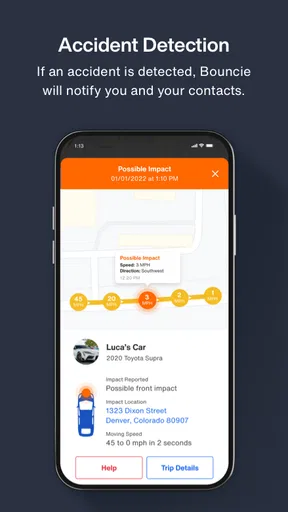
- Crash detection can alert contacts when a serious impact is detected.
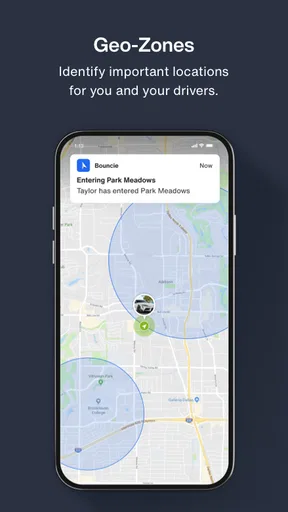
- Geofencing notifies you when a vehicle enters or leaves selected areas.
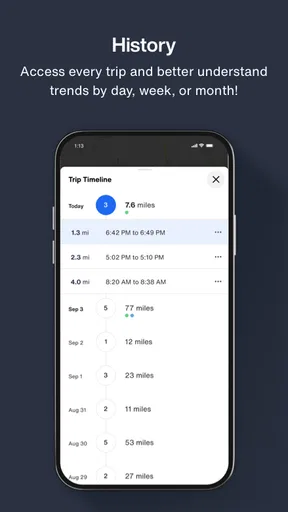
- Trip history makes it easy to review routes
- distances
- and driving times.
- Compact hardware installs quickly through the vehicle’s OBD-II port.
Cons
- Requires a monthly subscription in addition to purchasing the tracking device.
- Only works with vehicles that have a compatible OBD-II port.
- Location accuracy may decrease in garages
- tunnels
- or areas with weak cellular service.
- Some users may find frequent driving alerts distracting or excessive.
- The device can be unplugged
- potentially stopping tracking without immediate notice.
FAQs for Bouncie
What is Bouncie, and how does it work?
Bouncie is a connected-car tracking service designed to help families and vehicle owners monitor driving activity, vehicle location, and basic car health information. It typically uses a small device that plugs into the vehicle’s OBD-II port and communicates with the Bouncie mobile app. After installation, the app can display trips, routes, mileage, driving behavior, and selected alerts, depending on the subscription and device setup.
Is Bouncie compatible with every car?
Bouncie is generally designed for vehicles equipped with a standard OBD-II port, which is common in cars, trucks, and SUVs sold in the United States from the late 1990s onward. However, compatibility can vary by vehicle model, year, port location, and electrical configuration. Before downloading or purchasing the service, users should check Bouncie’s official compatibility information to confirm that their specific vehicle is supported.
What features does the Bouncie app provide?
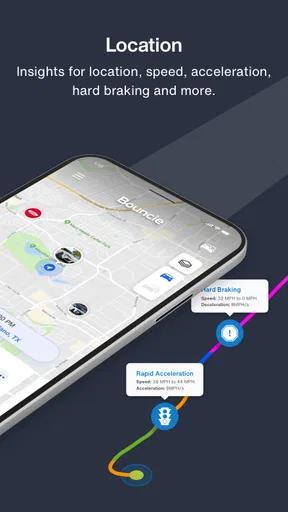
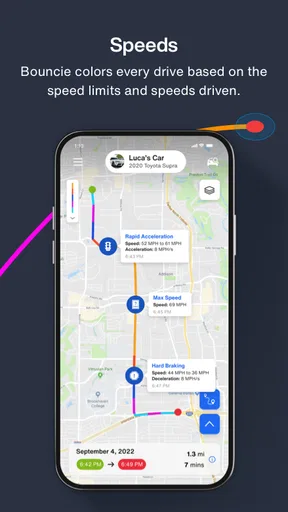
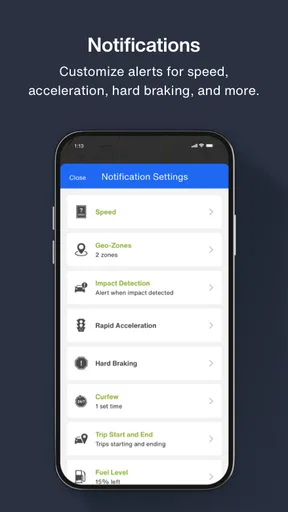
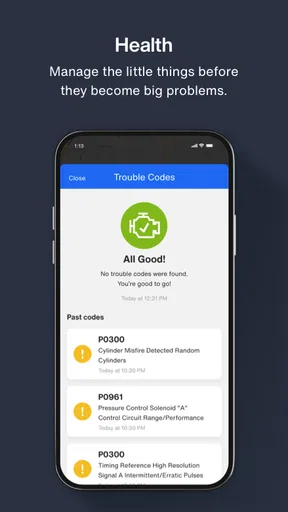
The Bouncie app focuses on practical vehicle monitoring rather than entertainment. Depending on the plan and device, users may be able to view real-time or recent vehicle location, trip history, routes, mileage, speed information, hard-braking events, rapid acceleration, and crash-related notifications. Some vehicles may also provide maintenance or diagnostic details. Feature availability can differ, so the app should be considered a monitoring companion rather than a complete car diagnostic system.
Does Bouncie require a subscription, and are there additional costs?
Bouncie normally requires an active subscription because the device depends on cellular connectivity to send vehicle information to the app. The total cost may include the tracking device, a monthly service fee, taxes, and any applicable activation or replacement charges. Pricing, trial offers, cancellation rules, and supported payment options can change over time. Users should review the current terms carefully before ordering or activating the service.
Is Bouncie suitable for monitoring a family member’s driving?
Bouncie can be useful for parents, caregivers, and vehicle owners who want visibility into trips, driving patterns, or a car’s location. It may help users discuss speeding, harsh braking, unfamiliar routes, or unexpected vehicle use. Nevertheless, responsible use is important: drivers should know that the vehicle is being monitored, and users should consider privacy, consent, local laws, and account security before sharing location data or setting up alerts.


